

By Fariha Ilyas
As the tablet market welcomes the likes of the Pixel Tablet and the recently unveiled Samsung Tab S9 series, Android is once again collaborating with developers to optimize their creative applications for these expansive screens.
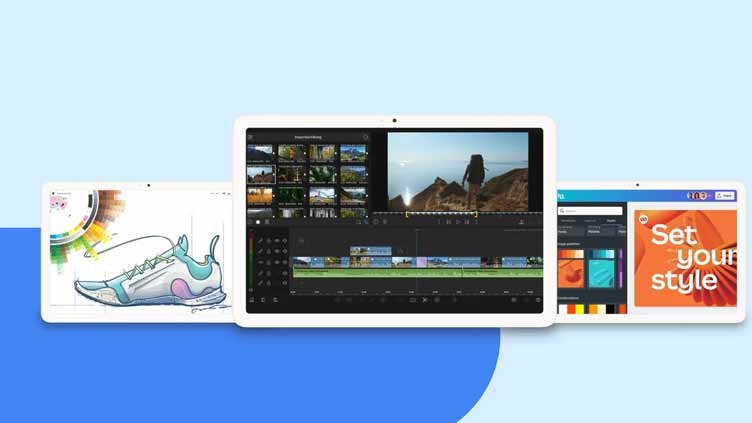
In a recent blog post, Google shone a spotlight on six apps that promise to elevate the creative potential of your Android tablet, igniting inspiration for your next project. Here, we delve into these digital tools that cater to your artistic and multimedia needs: LumaFusion, Concepts, Google Photos, Sketchbook, Adobe Lightroom, and Canva.
- LumaFusion
LumaFusion, a beloved video editing app, has extended its prowess to Android tablets. To ensure the Android version maintains the high-quality standards set by its iOS counterpart, the company enlisted a team of seasoned Android developers. This app offers a comprehensive video editing experience on your Android tablet, boasting features like the ability to edit up to six video tracks, an enhanced magnetic timeline, and the flexibility to cut, copy, and paste between projects.
- Concepts
Concepts, a vector-based sketchpad app, seamlessly adapts to various Android screen sizes, providing a delightful experience when used in conjunction with a stylus. To offer users an experience as natural as putting pen to paper, Concepts leverages Android’s tools and platforms, minimizing the lag between the stylus tip and the strokes on the digital canvas.
David Brittain, CEO of TopHatch, the developer of Concepts, acknowledges the role of Android’s robust APIs in simplifying the adaptation to diverse screen sizes and input methods. He affirms that “Android’s mature set of APIs make it easy.”
- Google Photos
Google Photos stands out as a versatile platform for storing and editing images. On tablets, its multi-column layout takes full advantage of the larger screen, granting you an expansive view of your photo collection. When editing images, a new side panel emerges, offering smart suggestions and user-friendly tools to streamline your editing process. Furthermore, if you’re using Google Photos in split-screen mode alongside a compatible app like Gmail, you can effortlessly drag and drop photos between the two applications, enhancing your multitasking capabilities.
- Sketchbook
Sketchbook is a digital sketching app that feels right at home on Android tablets. With an array of brushes and tools at your disposal, this app caters to artists and illustrators who demand precision and creativity in their work. It’s like having a sketchbook in your tablet, minus the mess of physical materials. For those who enjoy working with layers and intricate details, Sketchbook is a powerful choice.
- Adobe Lightroom
Adobe Lightroom empowers photographers to enhance their images with professional-grade editing tools. The Android tablet version offers a familiar interface, ensuring a smooth transition for photographers already well-versed in Lightroom. This app unlocks the potential of your tablet’s large screen, making it easier to fine-tune every detail of your photographs, from exposure to color correction. With Adobe Lightroom, your tablet becomes a digital darkroom where you can transform your photos into visual masterpieces.
- Canva
Canva is a design powerhouse that brings graphic design to your fingertips. With a vast library of templates and easy-to-use design tools, Canva simplifies the creative process for everyone, from amateur designers to marketing professionals. The Android tablet version leverages the additional screen real estate to provide an even more intuitive and visually engaging design experience. Whether you’re crafting social media graphics, presentations, or marketing materials, Canva has you covered.
The integration of these apps into the Android tablet ecosystem marks a significant stride in enhancing the creative potential of these devices. Users can now harness the power of their tablets to engage in video editing, digital sketching, photo enhancement, and graphic design, all with a level of convenience and efficiency that was once confined to desktop computers.
The rise of Android tablets as creative tools is not just a boon for individual users but also a testament to the adaptability of the Android platform. Developers are increasingly leveraging Android’s capabilities to optimize their applications for larger screens, resulting in a richer and more versatile user experience.
One remarkable aspect of this trend is the commitment to minimizing any lag or discrepancy in performance when using styluses or digital pens. Concepts, for instance, has worked diligently to ensure that the interaction between the stylus and the tablet screen feels as natural as traditional pen and paper. This commitment to replicating the tactile experience of physical artistry is a testament to the dedication of developers in catering to the unique needs of creative professionals and enthusiasts.
Moreover, Google Photos’ optimization for tablets showcases the practicality of multitasking on these devices. The ability to seamlessly drag and drop photos between apps in split-screen mode enhances productivity for users juggling multiple tasks. It’s a testament to the attention paid to the user experience in the Android tablet ecosystem.
In the realm of video editing, LumaFusion’s expansion to Android tablets is a significant development. This app’s versatility, allowing users to work with multiple video tracks and a magnetic timeline, empowers content creators to edit and produce high-quality videos on the go. The move to bring LumaFusion to Android reflects the increasing demand for robust video editing capabilities on tablets, further blurring the lines between mobile and desktop editing.
For photographers, Adobe Lightroom’s presence on Android tablets is a game-changer. The app’s comprehensive editing tools, designed for professionals, are now readily accessible on these devices. Photographers can leverage the larger screen real estate to make precise adjustments to their images, ensuring that every shot reaches its full potential.
In the world of design, Canva’s expansion to Android tablets democratizes graphic design. The app’s user-friendly interface and vast template library put the power of design in the hands of anyone with a tablet. Whether you’re a small business owner creating marketing materials or an educator designing engaging presentations, Canva provides the tools to bring your ideas to life.
As these creative apps continue to evolve and adapt to the Android tablet landscape, users can anticipate even more innovative features and improved performance. The synergy between developers and the Android platform is driving a creative revolution, one where tablets are no longer just consumption devices but powerful tools for content creation.
Let’s continue our exploration of the Android tablet’s newfound creative potential by diving into three more remarkable apps that are revolutionizing the way we sketch, edit photos, and design graphics.
4. Sketchbook
Sketchbook, the versatile sketching, painting, and drawing app, has undergone a transformation to ensure a seamless experience for tablet users. The app’s interface is designed with the artist in mind, intuitively adapting to the tablet screen size without intruding on your creative space. Armed with a rich assortment of customizable brushes, Sketchbook empowers you to bring your artistic visions to life. What sets this app apart is its compatibility with styluses, allowing you to hover the stylus over the canvas to preview your brush strokes before making them permanent. This innovative feature enables you to achieve greater precision and accuracy in your drawings, revolutionizing the way you create.
5. Adobe Lightroom
Adobe Lightroom, a renowned photo and video editing powerhouse, fully capitalizes on the abundant screen real estate offered by tablets. Its tablet version is thoughtfully designed to facilitate precise photo edits. With a vertical navigation bar housing all your editing tools, you can effortlessly fine-tune your images with precision and ease. An impressive feature is the ability to tap and hold on the tablet’s touch screen, giving you a before-and-after view of your edits. This visual comparison ensures that your enhancements align with your creative vision. Moreover, Adobe Lightroom supports the editing of RAW files, catering to photography enthusiasts who capture the raw beauty of life with their Android devices. This feature-rich app transforms your tablet into a professional editing suite, providing you with the tools to elevate your photography to new heights.
6. Canva
Canva, the graphic design app that has taken the creative world by storm, introduces intuitive drag-and-drop functionality, streamlining the content addition process. Whether you’re importing content from your uploaded files or seamlessly integrating elements from apps like Google Photos and Chrome, Canva’s drag-and-drop feature empowers you to craft stunning designs with remarkable ease. In addition to this enhancement, Canva has optimized its layouts for larger tablet screens, introducing a vertical navigation bar that grants you an expansive canvas for your creative endeavors. With this extra space, your imagination knows no bounds as you design captivating graphics, marketing materials, and presentations. Canva’s user-friendly interface ensures that both beginners and seasoned designers can unlock their creative potential, making graphic design accessible to all.

Check out our monthly English and Urdu magazines on Homepage
In the realm of digital artistry, Sketchbook stands as a beacon for artists seeking a digital canvas that feels as intuitive as traditional paper. The app’s commitment to preserving the fluidity of the creative process is evident in its tablet interface, which seamlessly adapts to different screen sizes. This ensures that your focus remains on your art, unhindered by technical distractions. The inclusion of customizable brushes further enriches your creative toolkit, allowing you to explore a wide range of artistic styles and techniques. Most notably, Sketchbook’s compatibility with styluses introduces a level of precision that mirrors the tactile experience of physical drawing. By enabling stylus users to preview brush strokes, the app empowers artists to craft intricate and accurate drawings with ease. Whether you’re a professional illustrator or an aspiring artist, Sketchbook empowers you to unleash your creativity without constraints.
Adobe Lightroom caters to photographers who demand nothing less than perfection in their images. With the transition to tablet screens, the app’s interface remains user-friendly while capitalizing on the additional space for a more immersive editing experience. The vertical navigation bar streamlines access to a comprehensive suite of editing tools, ensuring that every adjustment is just a tap away. One of the standout features is the before-and-after view, activated by a simple tap and hold on the touch screen. This feature allows photographers to meticulously analyze the impact of their edits, guaranteeing that their artistic vision is faithfully realized. Moreover, Adobe Lightroom’s support for RAW file editing is a game-changer for photographers who capture the world’s beauty in its purest form. The ability to edit RAW files directly on a tablet elevates the platform into a powerful editing tool for professionals and enthusiasts alike.
Canva, the democratizing force in graphic design, empowers users to unleash their creativity without the need for extensive design skills. With the introduction of drag-and-drop functionality, designing captivating graphics, presentations, and marketing materials becomes an effortless endeavor. Canva’s adaptability extends to content integration, allowing users to seamlessly incorporate elements from various sources, including their uploaded files and other apps. The optimization of layouts for larger tablet screens ensures that designers have ample space to craft visually stunning creations. The vertical navigation bar provides easy access to design elements and tools, further enhancing the user experience. Whether you’re a small business owner in need of marketing materials or an educator designing engaging presentations, Canva simplifies the design process, making it accessible to everyone.
In conclusion, these creative apps represent a transformative chapter in the evolution of Android tablets. By harnessing the tablet’s expansive screen real estate, developers have unlocked new possibilities for artists, photographers, and designers. Sketchbook, Adobe Lightroom, and Canva stand as prime examples of how digital tools can enhance and simplify creative processes. With interfaces optimized for tablets, these apps ensure that the transition from traditional mediums to digital platforms is seamless and intuitive. Whether you’re sketching intricate artwork, fine-tuning photographs, or designing captivating graphics, Android tablets are now formidable allies in your creative journey. As these apps continue to evolve and innovate, the realm of creative expression expands, promising exciting opportunities for artists and creators worldwide. The fusion of technology and creativity has never been more promising, and the canvas of possibilities on Android tablets continues to broaden.
Subscribe our website for latest updates:
https://republicpolicy.com/shop/
Read More